


Start a workflow from an RSS feed
Run a workflow every time a blog, news site or podcast publishes something new. Use the article's title, link, author and text in your blocks. Step by step with a narrated video and real automatic runs.
What you'll build: every time a blog publishes a new article, BeeGentic starts your workflow and an AI sums it up in two sentences. Two blocks: RSS Feed → Agent. About 5 minutes.
Not supported: feeds behind a login or on a private network, sending items that were already in the feed before you deployed, choosing a different check interval, more than 25 new items per check, keyword filters inside the trigger (add a Condition block after it), and JSON Feed.
Narrated walkthrough (about 2 min), with captions (CC button). Each step below also has a short silent clip. The orange numbers in each screenshot match the # column under it. Click a screenshot to enlarge it.
Before you start
| You need | Why |
|---|---|
| The address of a feed | BeeGentic watches it. We used DEV Community's https://dev.to/feed/latest, which gets new articles every few minutes. |
An AI key saved as a secret, e.g. OPENAI_API_KEY | The Agent writes the summary. See References and secrets. |
Part 1: Add the RSS Feed trigger
Create the workflow
+ New workflow → name it New article summary (RSS). The feed starts this workflow, so select the Start block and press Delete.
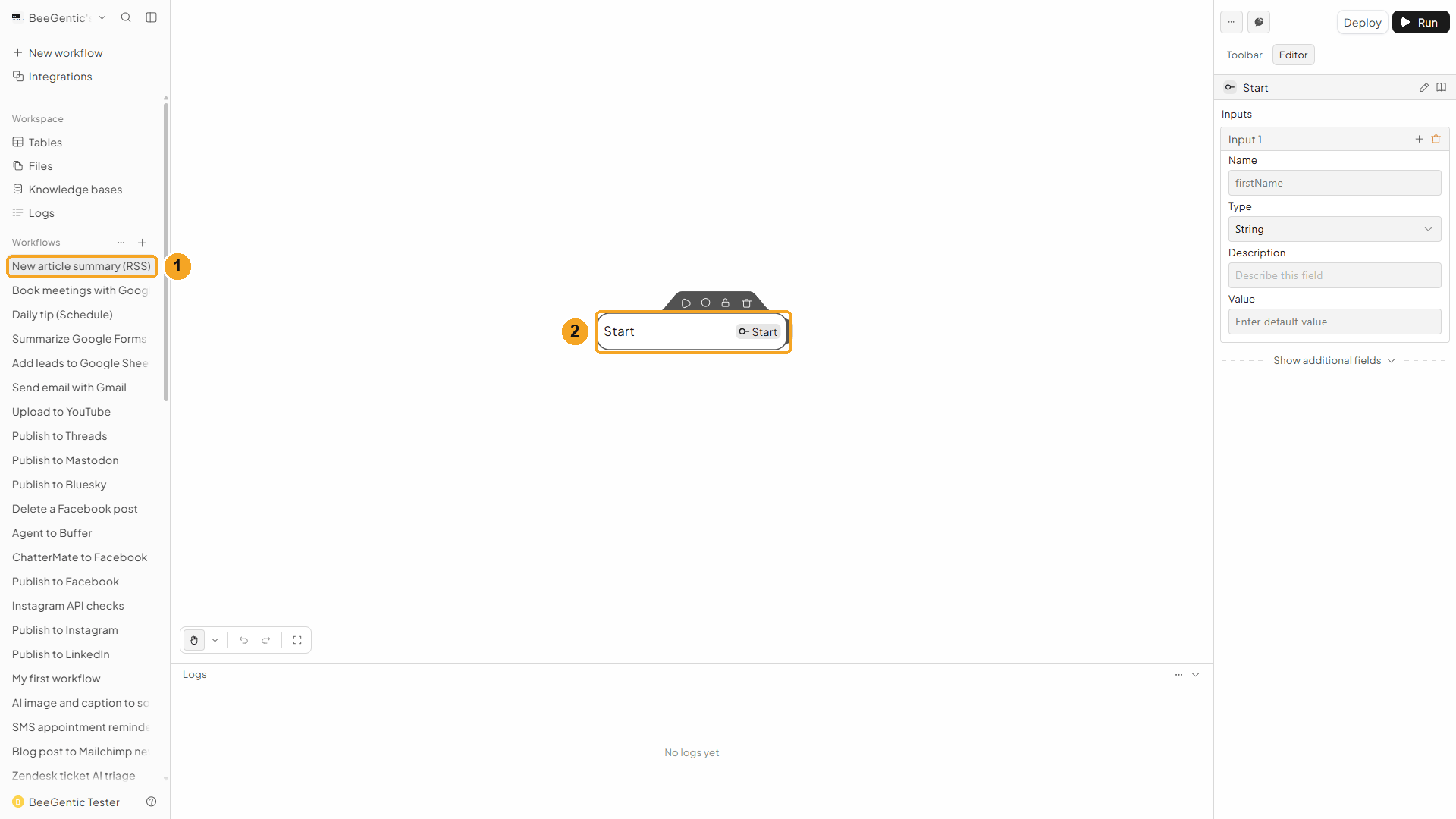
| # | What you see |
|---|---|
| 1 | Your new workflow in the sidebar. |
| 2 | The Start block. Select it, then delete it. |
Watch this step
Add RSS Feed from the Toolbar
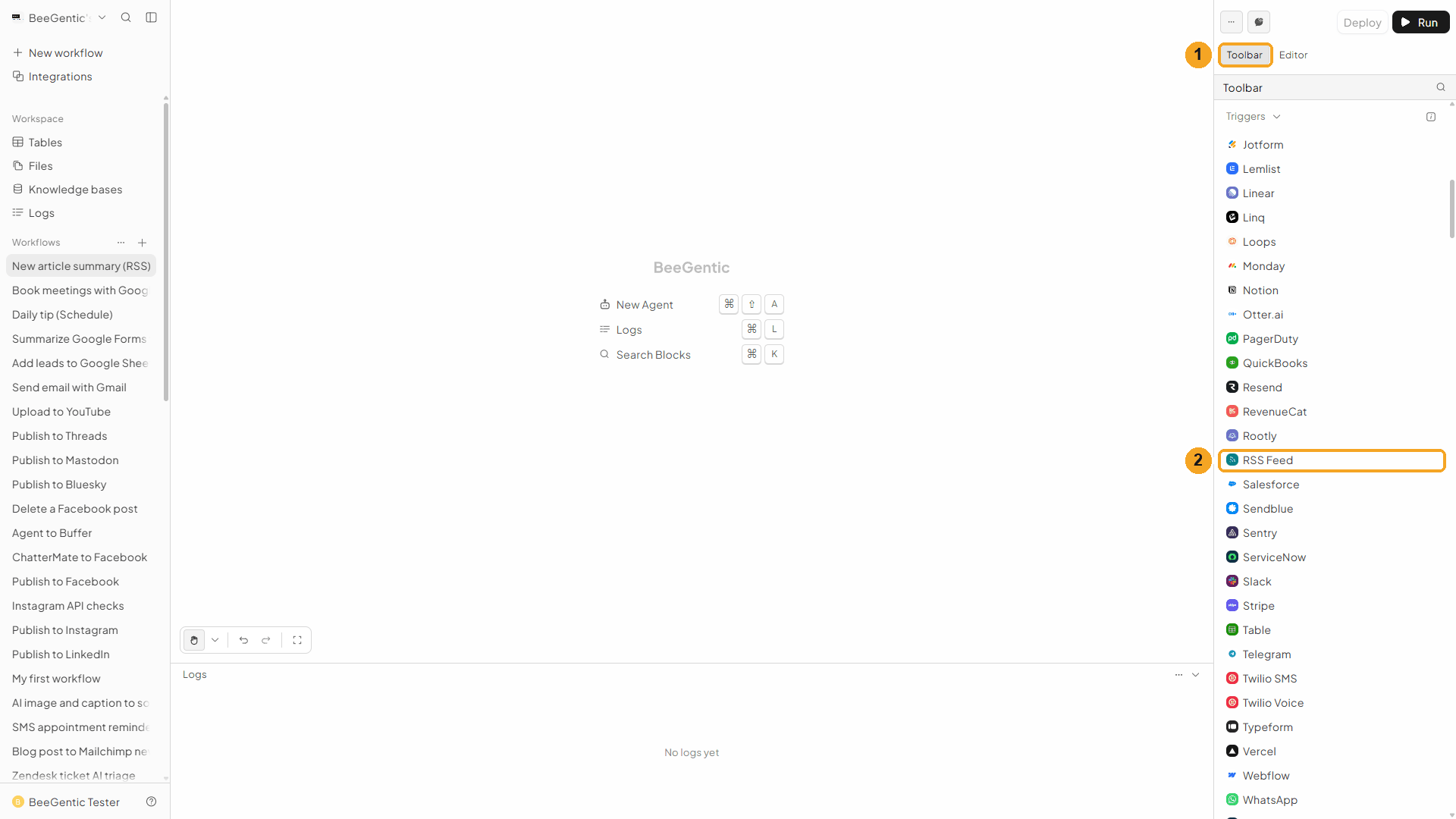
| # | What to do |
|---|---|
| 1 | Open the Toolbar tab. |
| 2 | Under Triggers (alphabetical), scroll down and click RSS Feed. |
Watch this step
Paste the feed address
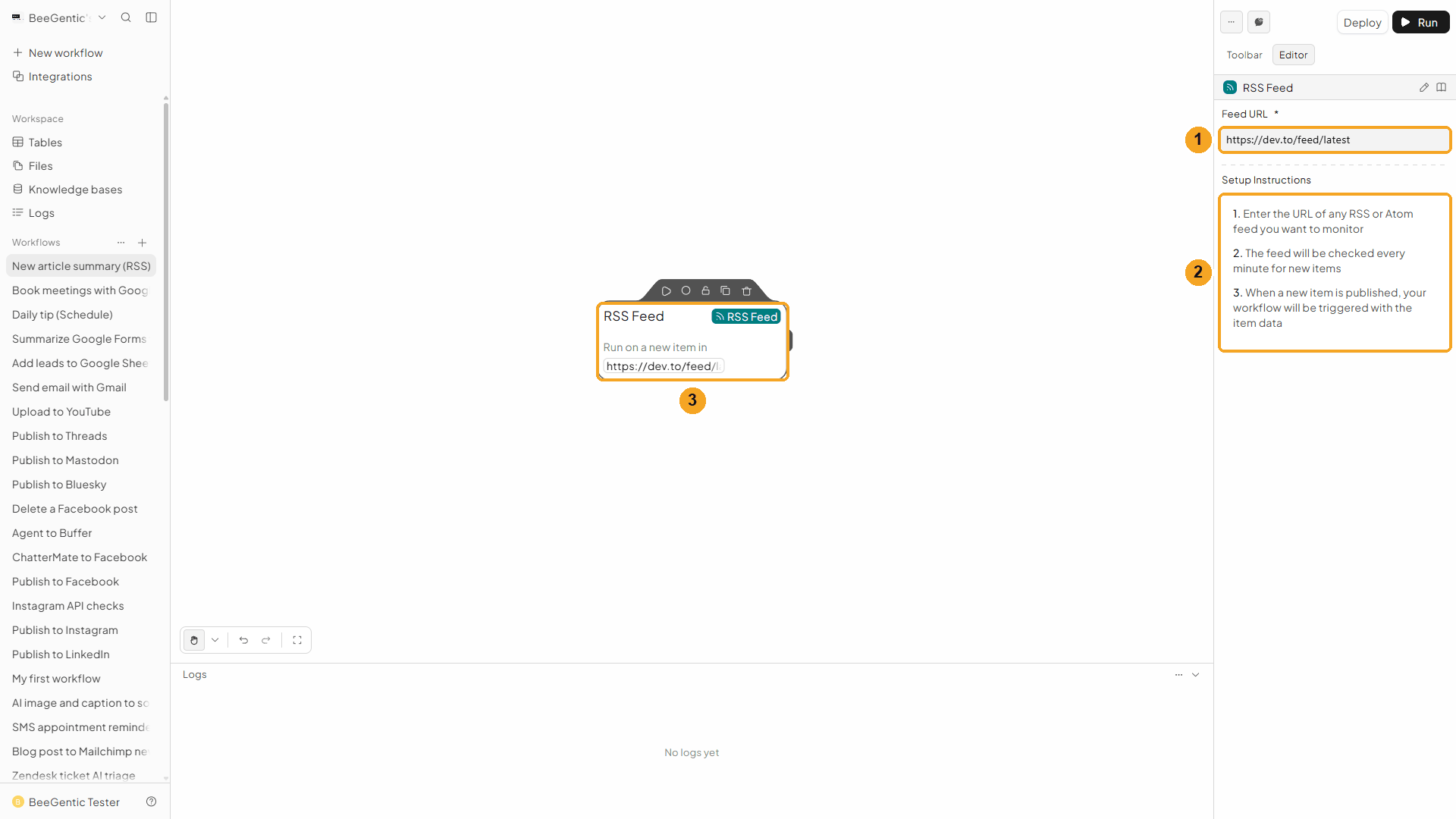
| # | What you see |
|---|---|
| 1 | Feed URL: https://dev.to/feed/latest. |
| 2 | Setup Instructions: the feed is checked every minute, and each new item starts the workflow. |
| 3 | The block sums it up: Run on a new item in https://dev.to/feed/latest. |
Watch this step
Part 2: Use the article in the Agent
See what the feed gives you
With RSS Feed selected, click Toolbar → Agent. It connects automatically. In Messages, type < and open RSS Feed → item.
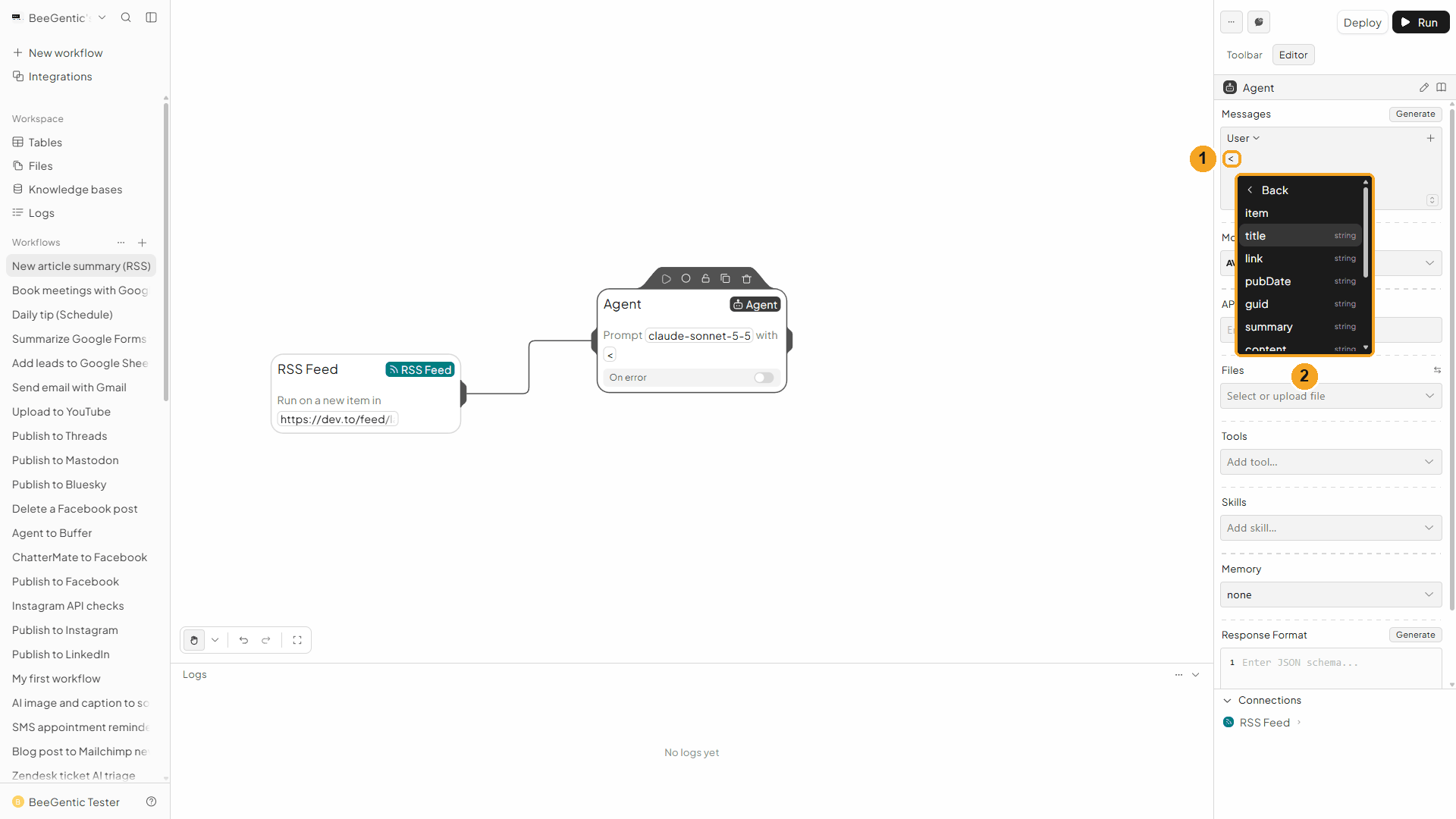
| # | What you see |
|---|---|
| 1 | Typing < opens the list of values from earlier blocks. |
| 2 | The fields of the new item: title, link, pubDate, guid, summary, content … |
Everything the trigger hands over:
| Reference | What it holds | Our real run |
|---|---|---|
<rssfeed.item.title> | Article title | Hello Hacktoberfest 2026 |
<rssfeed.item.link> | Article address | https://dev.to/dyarawilliams/-4he5 |
<rssfeed.item.pubDate> | Publication date, as the feed writes it | Fri, 02 Oct 2026 22:33:59 +0000 |
<rssfeed.item.isoDate> | Same date in ISO format | 2026-10-02T22:33:59.000Z |
<rssfeed.item.author> | Author | D'yara Williams |
<rssfeed.item.contentSnippet> | The text without HTML (best for the Agent) | Everything You Need To Know About Hacktoberfest 2026… |
<rssfeed.item.content> | Full content, with HTML | |
<rssfeed.item.guid> | The item's unique ID | https://dev.to/dyarawilliams/-4he5 |
<rssfeed.item.categories> | Tags, as a list | |
<rssfeed.item.enclosure> | Attached media (podcast audio, image): url, type, length | |
<rssfeed.feed.title> | The feed's name | DEV Community: Latest |
<rssfeed.feed.link> | The site's address | |
<rssfeed.timestamp> | When BeeGentic picked up the item | 2026-10-02T22:43:01.894Z |
item.summary is the feed's own summary (or the snippet when the feed has none); feed.feedDescription is the feed's tagline.
Watch this step
Write the message
Press Esc, clear the <, then type:
Summarize this new article in 2 sentences for a busy reader. Title: <rssfeed.item.title> Author: <rssfeed.item.author> Snippet: <rssfeed.item.contentSnippet> Link: <rssfeed.item.link> Return only the summary.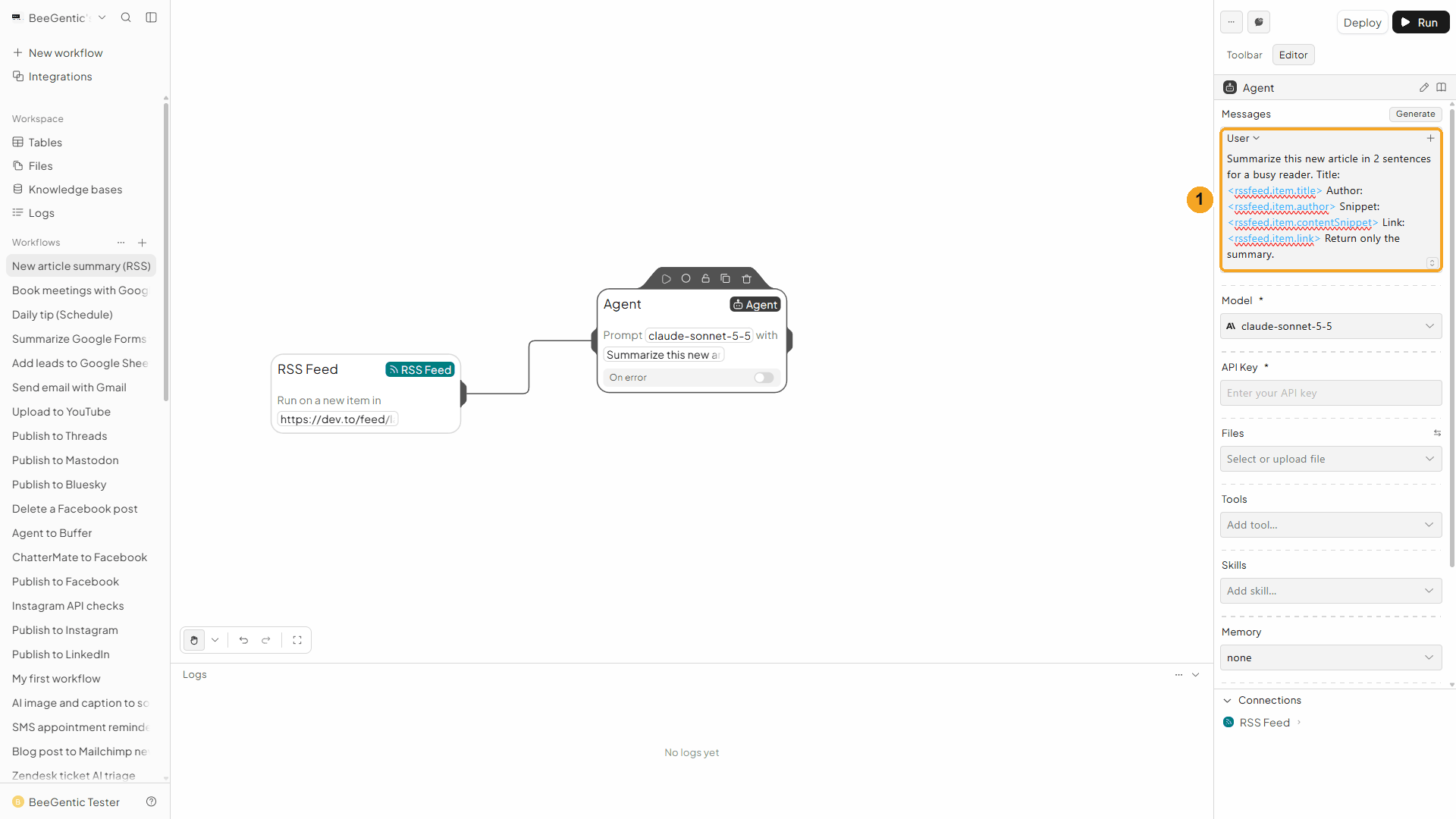
| # | What you see |
|---|---|
| 1 | The message. The blue references are replaced by each new article's values when it runs. |
Watch this step
Choose the model and key
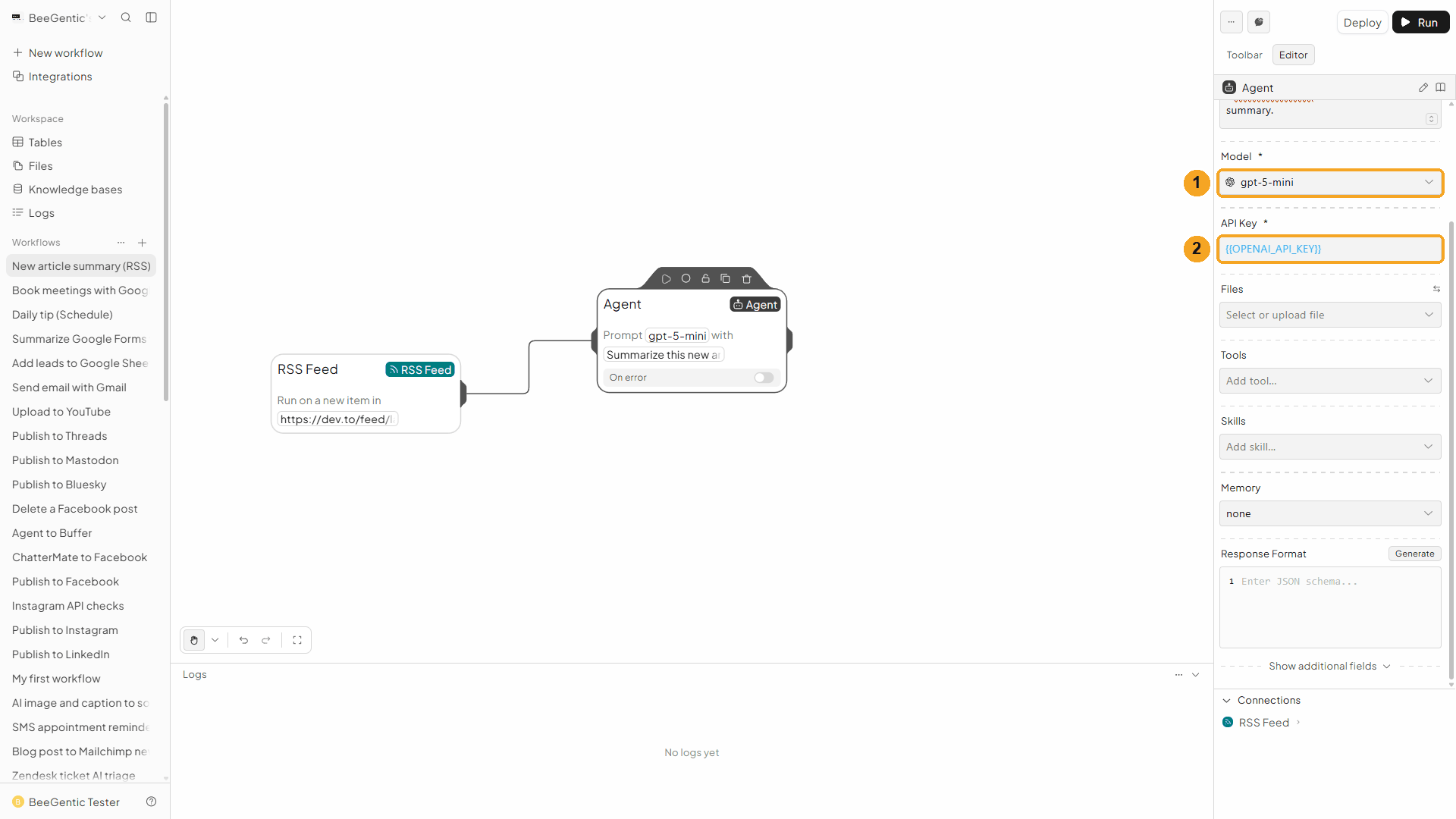
| # | Field | Value |
|---|---|---|
| 1 | Model | gpt-5-mini |
| 2 | API Key | {{OPENAI_API_KEY}} |
Press Shift + L to tidy the canvas:
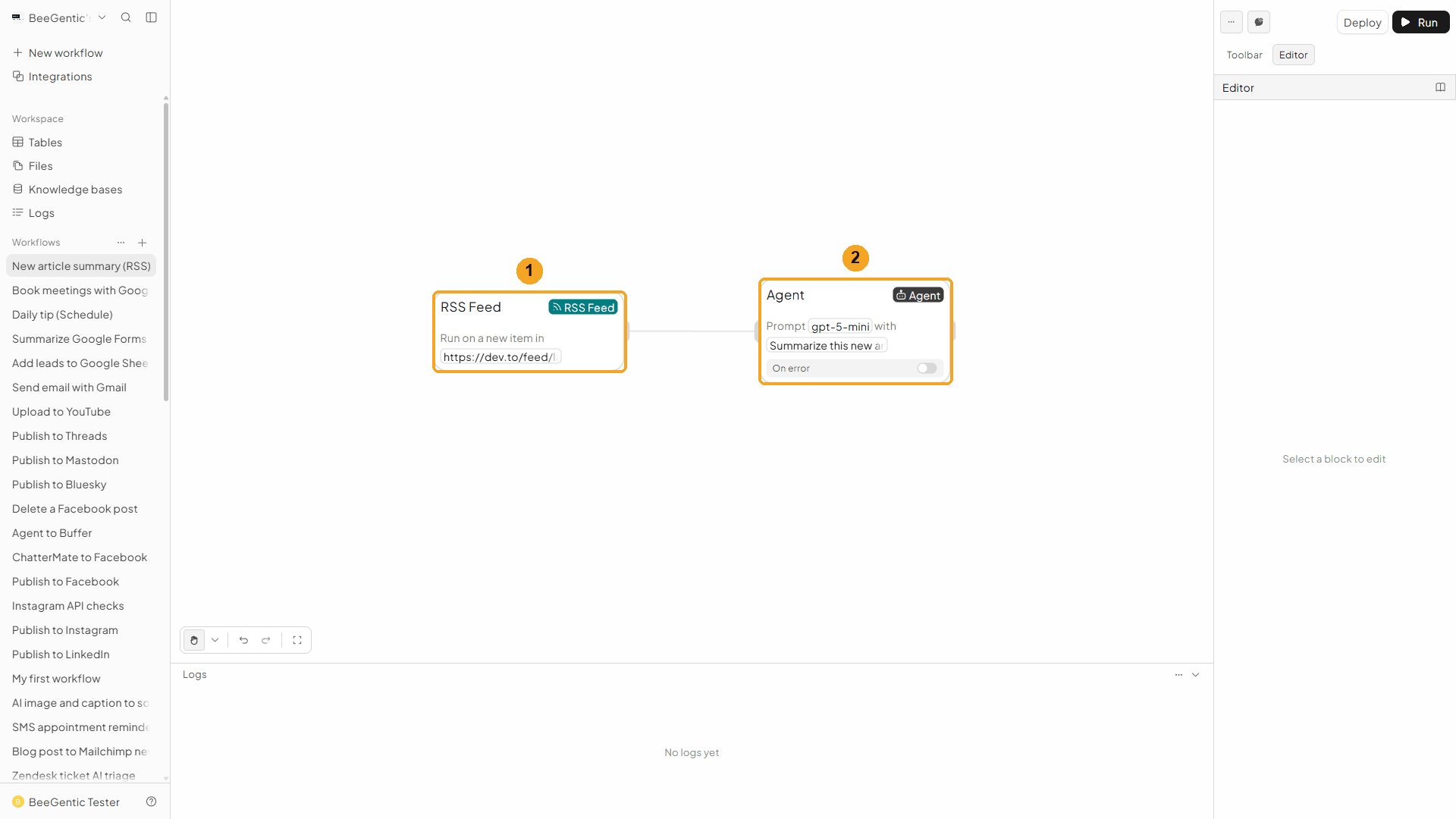
| # | Block | What it does |
|---|---|---|
| 1 | RSS Feed | Starts the workflow for each new article |
| 2 | Agent | Writes the two-sentence summary |
Watch this step
Part 3: Deploy and watch the runs
Deploy
A feed trigger only works when the workflow is deployed. Click Deploy (top right).
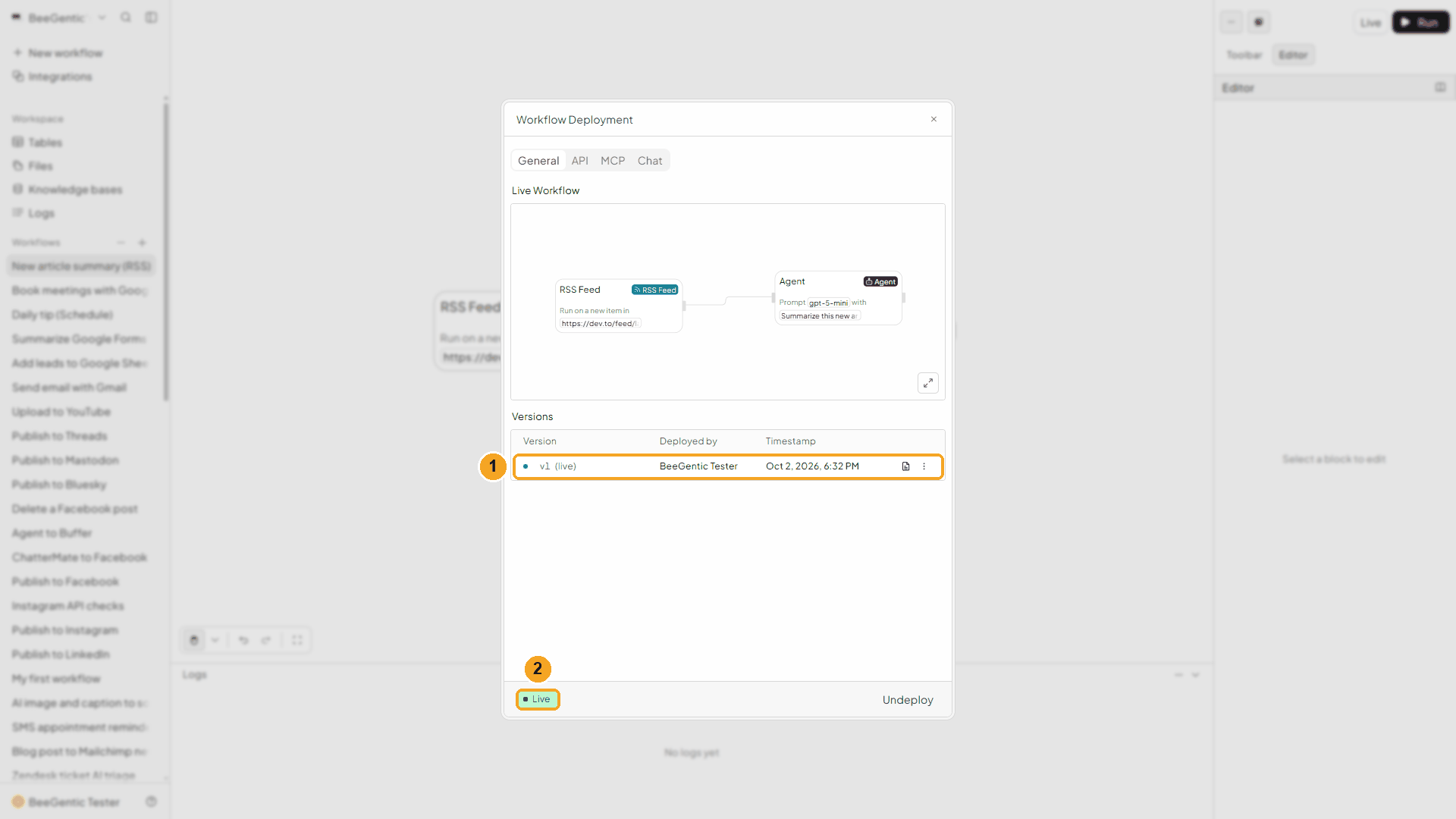
| # | What you see |
|---|---|
| 1 | Version v1 (live). |
| 2 | Live. From now on BeeGentic checks the feed every minute. Articles that were already in the feed are skipped; only new ones start a run. |
Watch this step
New articles start runs
Open Logs. In our test the first new articles showed up about 11 minutes after we deployed (the site takes a while to update its feed), all in one check.
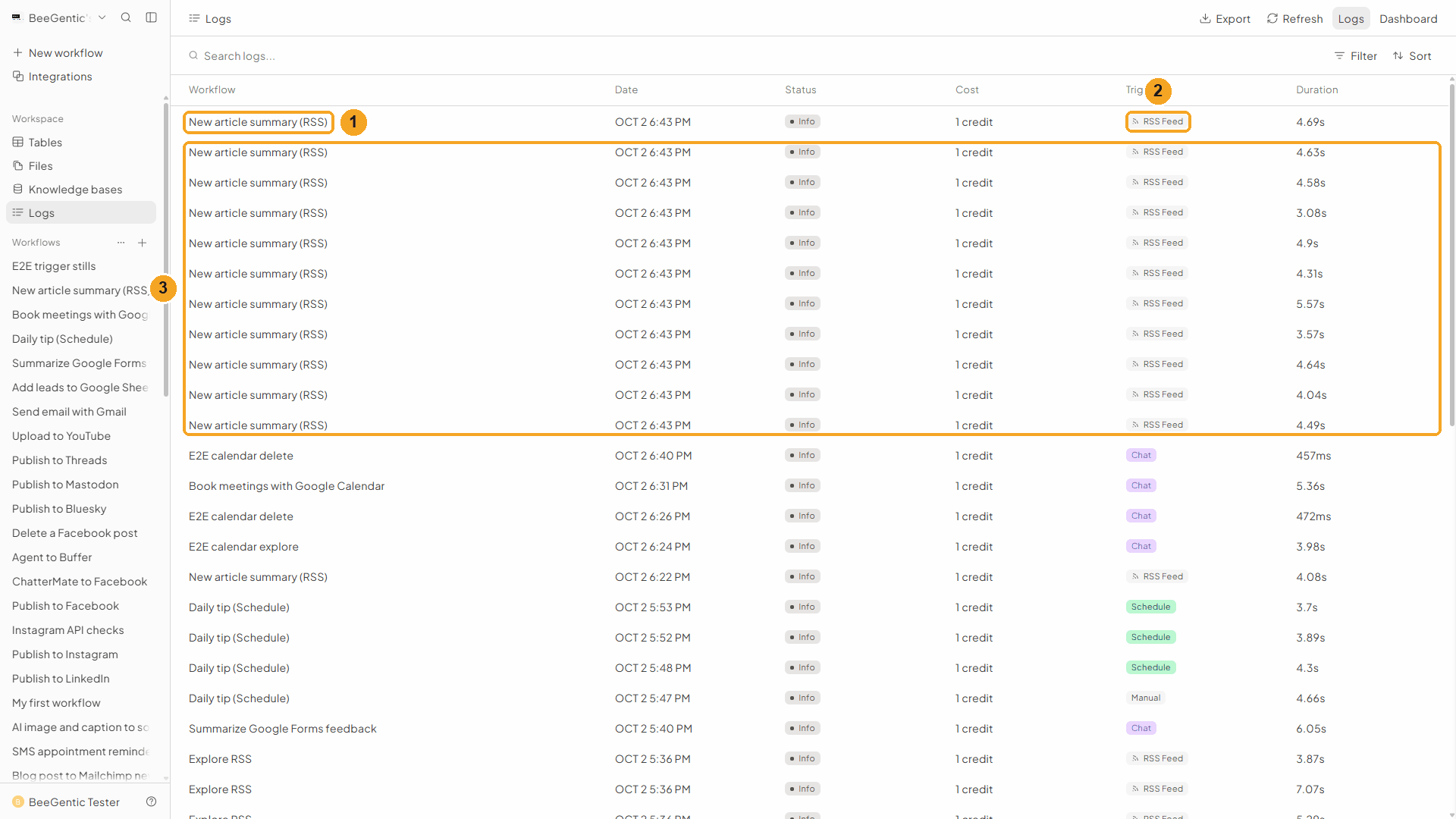
| # | What you see |
|---|---|
| 1 | A run of New article summary (RSS). |
| 2 | Trigger: RSS Feed. |
| 3 | 11 new articles arrived in one check, so 11 runs started: one per article, 1 credit each. |
Watch this step
The article BeeGentic found
Click a run.
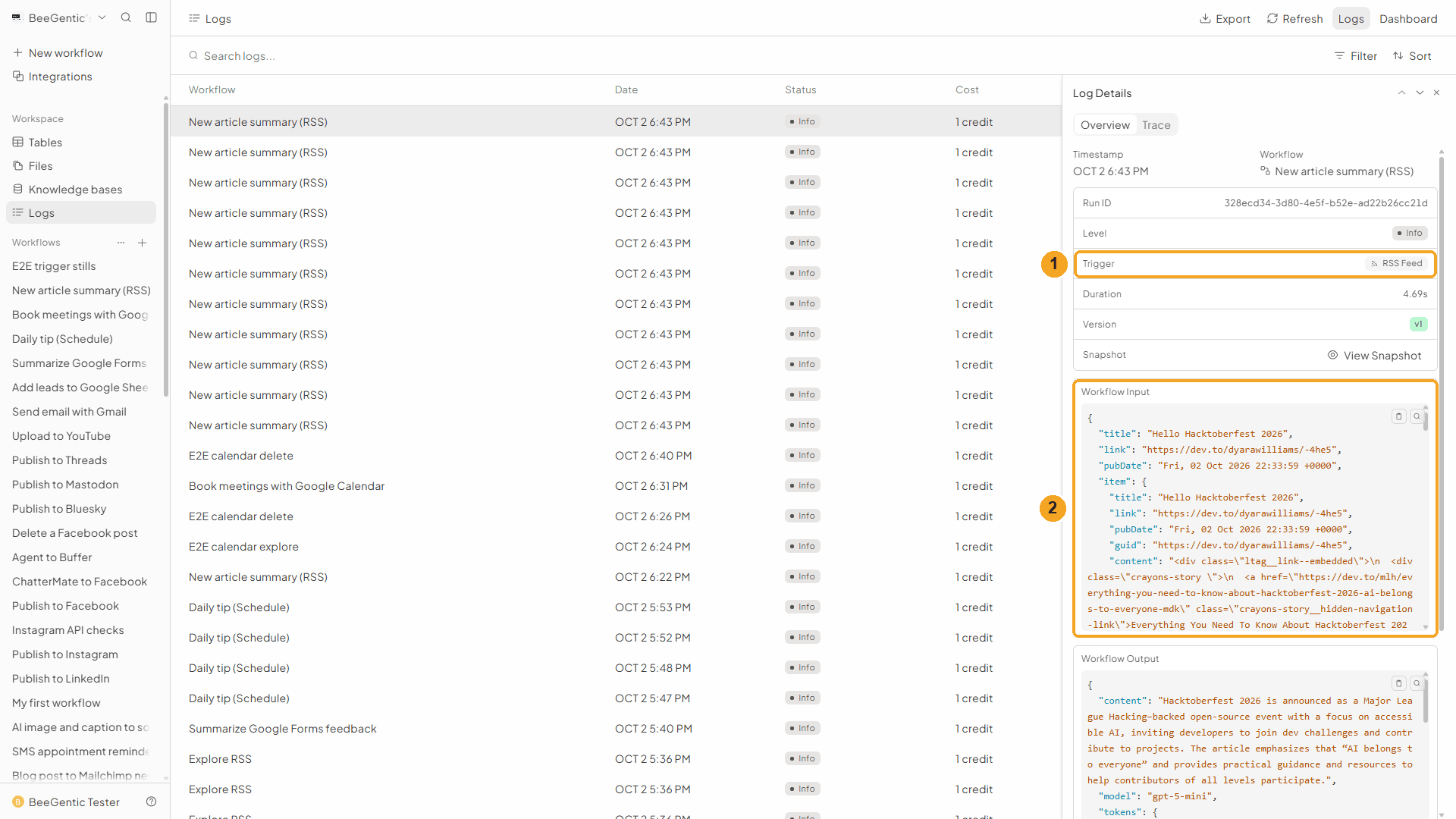
| # | What you see |
|---|---|
| 1 | Trigger: RSS Feed. |
| 2 | Workflow Input: the new item, with title, link, pubDate, guid, content … These are the values behind <rssfeed.item.…>. |
Watch this step
The summary
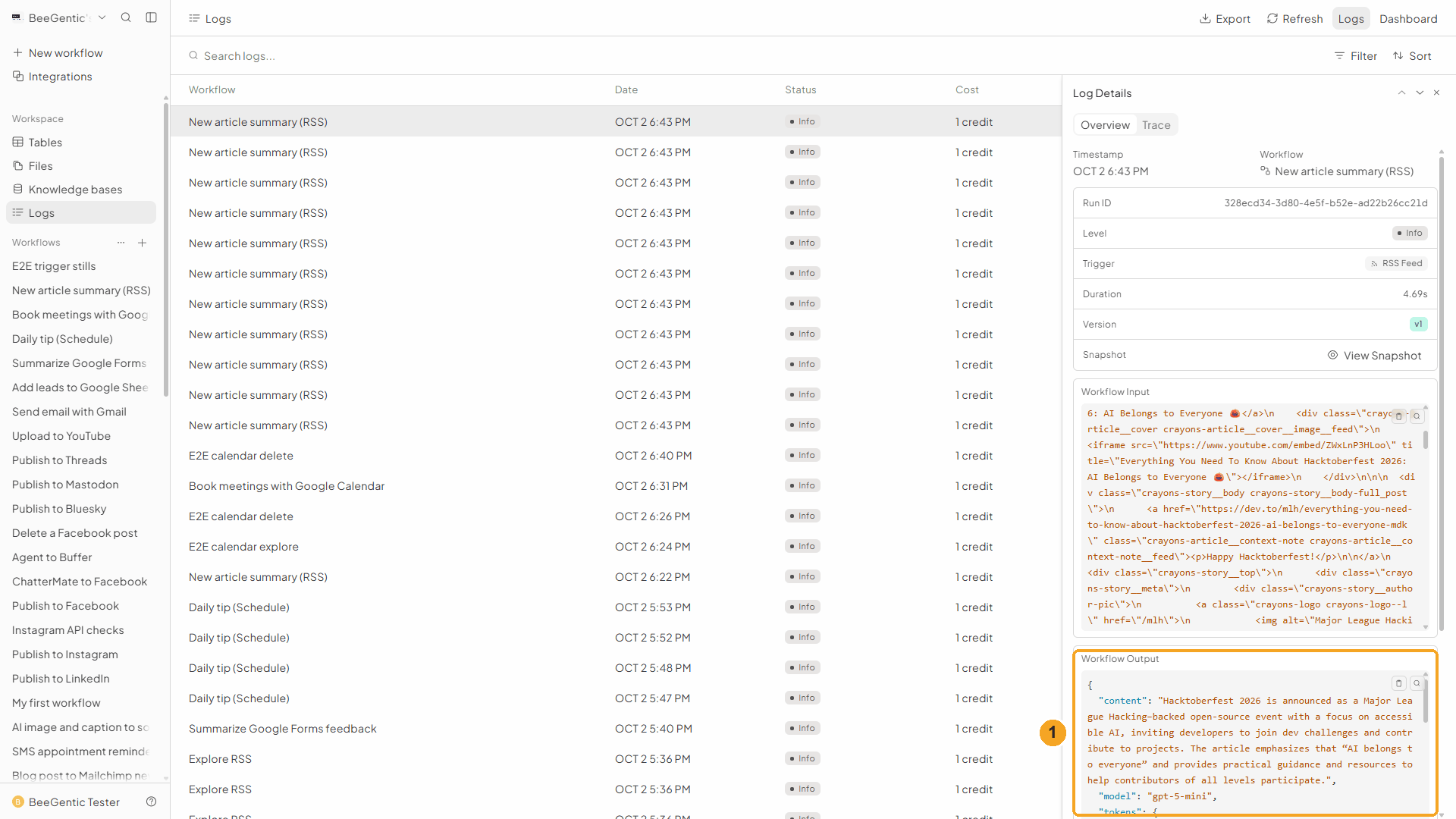
| # | What you see |
|---|---|
| 1 | Workflow Output: content is the Agent's summary. |
The real article (Hello Hacktoberfest 2026 by D'yara Williams, published 22:33 UTC, picked up 22:43 UTC) and the summary BeeGentic wrote:
Watch this step
Undeploy when you're done testing
A busy feed can start many runs. To stop it: Live → Undeploy, then confirm.
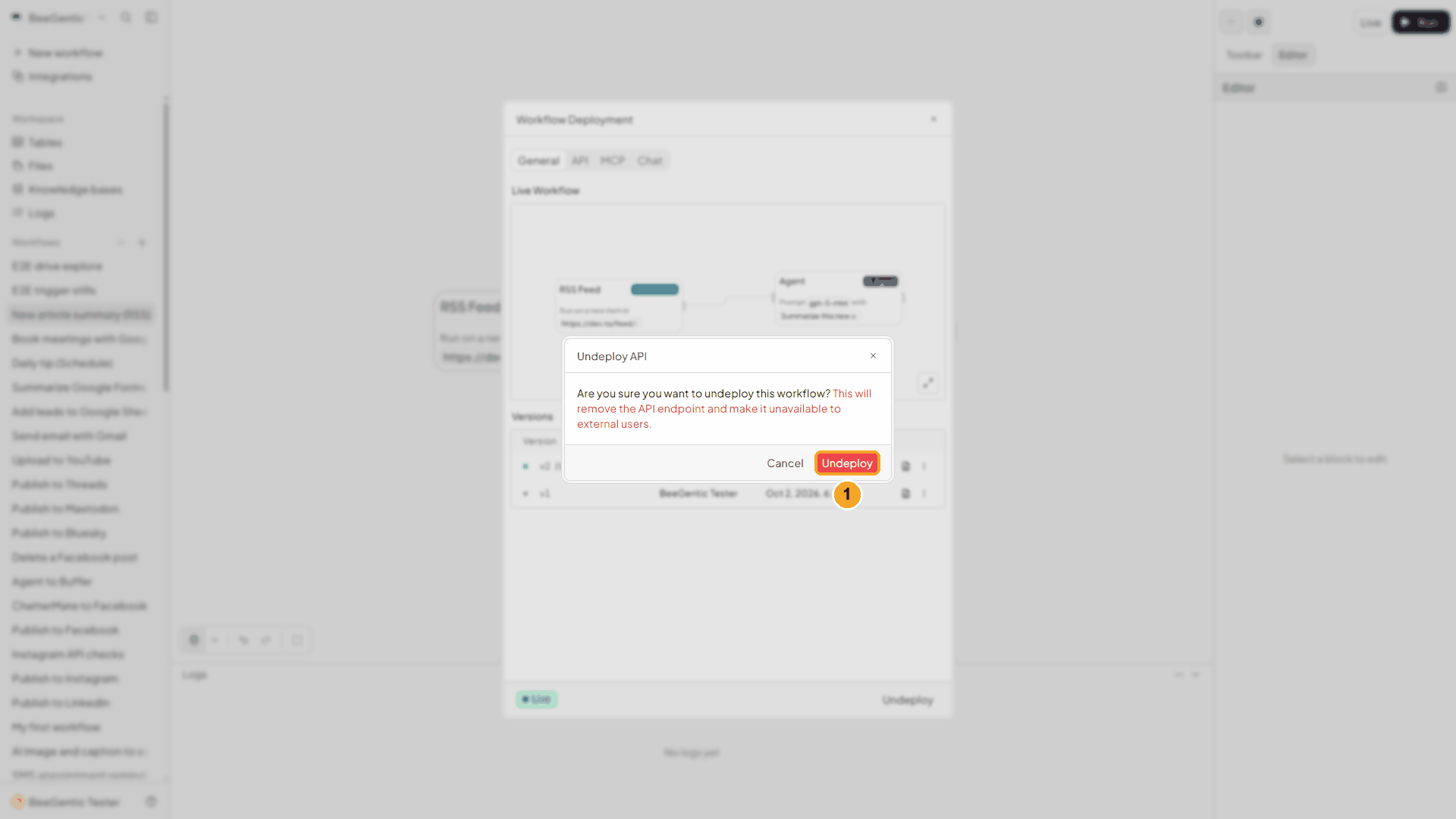
| # | What to do |
|---|---|
| 1 | Click Undeploy. The workflow stays, but stops watching the feed. Deploy again any time. |
We undeployed this demo workflow after recording.
Watch this step
Example settings
Trigger:        RSS Feed
Feed URL:       https://dev.to/feed/latest
Agent model:    gpt-5-mini
Agent message:  Summarize this new article in 2 sentences for a busy reader.
                Title: <rssfeed.item.title> Author: <rssfeed.item.author>
                Snippet: <rssfeed.item.contentSnippet> Link: <rssfeed.item.link>
                Return only the summary.
⚡ Make it useful
Add a block after the Agent and use <agent.content> (the summary) and <rssfeed.item.link> (the article):
| You want | Add after the Agent |
|---|---|
| Post each new article on Bluesky with a link card | Bluesky: Post Text <agent.content>, Link <rssfeed.item.link> |
| Share each article on LinkedIn | |
| Post it on Mastodon or Threads | Mastodon, Threads |
| Email the summary to your team | Gmail → Send Email |
| Keep a reading list | Google Sheets → Append Data: title, link, date, summary |
| Only some articles | A Condition block after RSS Feed, e.g. only when <rssfeed.item.title> mentions AI |
| One digest a day instead of one message per article | Use a Schedule instead, and have the Agent read the site |
Ideas
| Idea | Feed |
|---|---|
| Your company blog → social posts | Your blog's /feed |
| Competitor watch → email brief | A competitor's blog feed |
| New podcast episode → newsletter blurb | The podcast's RSS (audio in <rssfeed.item.enclosure>) |
| Industry news → team channel | A news site's section feed |
Troubleshooting
| Problem | Fix |
|---|---|
| Nothing appears in Logs | Check the top button says Live. Then wait: only articles published after you deployed start a run, and some feeds update slowly. Open the feed address in your browser to see the newest date. |
| Nothing ever runs for one feed | Some sites refuse automated requests or answer too slowly. In our tests https://hnrss.org/newest never worked from BeeGentic, while the feeds above did. Try another feed for the same site. |
| A field is empty | Not every feed fills every field (e.g. no author or no feed description). Use contentSnippet for the article text; it's always filled when the feed has text. |
| Too many runs | Every new item is its own run (1 credit with gpt-5-mini in our test). Pick a quieter feed, filter with a Condition block, or Undeploy. |
| HTML in the Agent's text | Use <rssfeed.item.contentSnippet> instead of content. |
| Feed behind a login | Not supported: the feed must be public. |
Run a workflow on a schedule
Start a workflow automatically every few minutes, hourly, daily, weekly, monthly or on a cron schedule, in your time zone. Step by step with a narrated video and a real automatic run.
Send email with Gmail
Send, draft, reply to, search and label Gmail messages from a workflow, or start a workflow when an email arrives. Step by step with a narrated video and a real result.