


Instagram auto-share to Facebook
What Instagram's "Sharing across profiles" does, how to turn it on, and why it doesn't copy posts that BeeGentic publishes.
Instagram can copy your posts and stories to Facebook automatically. It's a setting in Meta's Accounts Center. Many people expect it to cover BeeGentic's Instagram posts too, so we tested it.
Tested on 2 Oct 2026: auto-share does not copy posts that BeeGentic publishes. Meta applies it only to posts you create in the Instagram app. Posts published through Instagram's API, which BeeGentic and every other automation tool use, are not shared to Facebook, even with the setting on. To post to Facebook automatically, add a Facebook Page block next to your Instagram block. See Publish to a Facebook Page.
Post to Instagram and Facebook from one workflow (recommended)
Use one writer and two network blocks:
| Block | Setting |
|---|---|
| Start | Your topic |
| Agent (or ChatterMate) | Writes the caption |
Publish Image, Caption <agent.content>. See Publish to Instagram | |
| Facebook Page | Create Photo Post with the same image URL, or Create Post, using <agent.content>. See Publish to a Facebook Page |
Connect both the Instagram and Facebook Page blocks to the Agent. They run side by side, and each returns its own post link.
Turn on auto-share (for posts you make in the Instagram app)
This is still useful for posts and stories you create by hand in Instagram.
Open Sharing across profiles
In Instagram: Settings → Accounts Center → Connected experiences → Sharing across profiles. On a computer, go to accountscenter.instagram.com → Connected experiences.
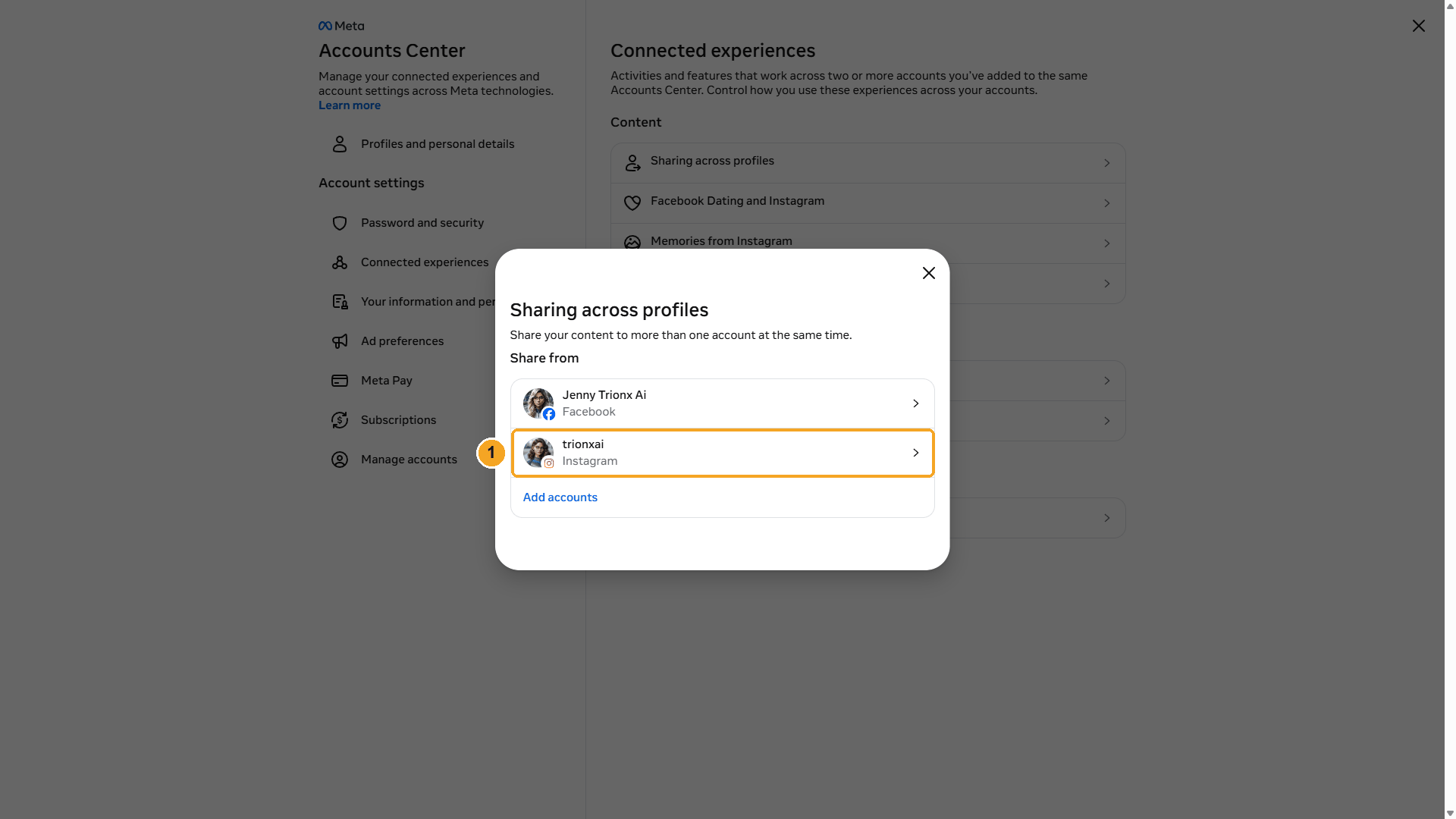
| # | What to do |
|---|---|
| 1 | Under Share from, pick your Instagram account. |
Choose where to share and switch it on
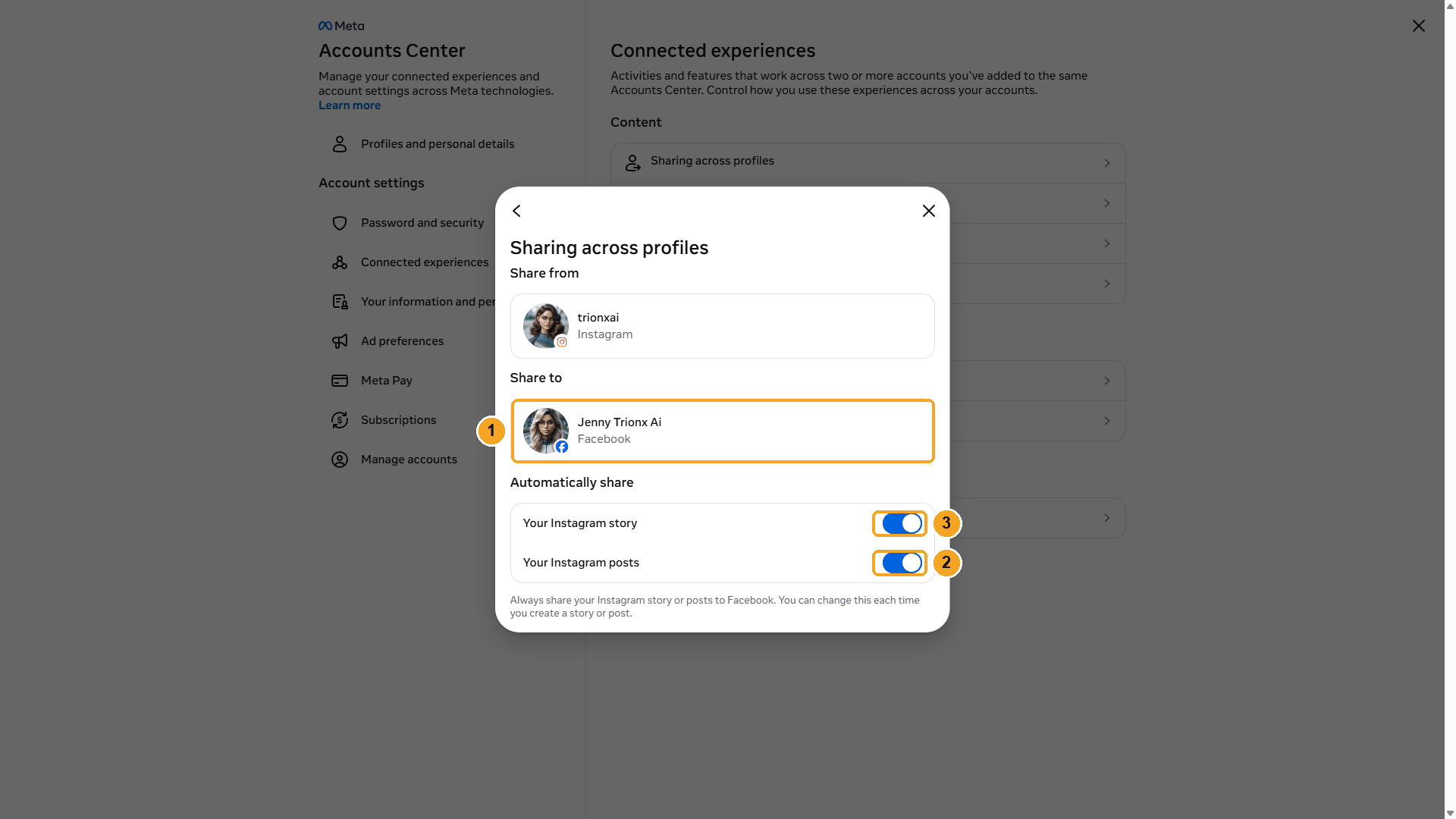
| # | What to do |
|---|---|
| 1 | Share to: the Facebook profile or Page that should receive the posts. |
| 2 | Turn on Your Instagram posts. |
| 3 | Optional: turn on Your Instagram story too. |
Changes save automatically. You can still switch sharing off for a single post in the Instagram app when you create it.
Summary
| Post made… | Copied to Facebook by auto-share? |
|---|---|
| In the Instagram app | ✅ Yes, when the setting is on |
| By BeeGentic (Instagram API) | ❌ No. Use a Facebook Page block instead. |
| By other tools through the API (Buffer, Later, Zapier…) | ❌ No. Those tools post to Facebook as a separate channel. |
Facebook via Buffer
BeeGentic writes the post and hands it to Buffer, and Buffer publishes it to your Facebook Page on your schedule or right away. Real result included.
Publish to Threads
Post text, links, images, videos and carousels to Threads from a workflow. Connect your Threads profile once. Real result included.